
How to build data centre for the future?
data centre technologies
How to build data centre for the future?
Data Center Infrastructure ia a Facilities for Corporate or Government who use Information Technologies in Large Scale and have 7x24 Hours Standard Operation. Data Center very Important and need standard to build and Operation. Our Company have many experiance to design, build and maintenan the Data Center in All Indonesia .
The First Hot Containment Data Centre in Indonesia
Green Data Centre
Our Company always concern of Efisiensy and everthing technology to make Earth Better, thats way we are very concert about "Green Data Center" The development of the Data Center currently follows the concept of a Green Data Center or Eco Data Center, where the Data Center uses the least amount of Energy with the least possible impact on the environment.
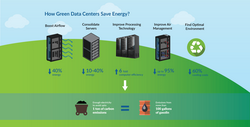
Current technology developments such as the increase in Server with the concept of Hybrid Converged Infrastructure (HCI), where the use of Power is very economical and automatically reduces the need for Cooling. In addition to cooling, the need for electrical energy has also undergone a change in the concept of "Green Data Center", where the use of Electrical Energy which is estimated for the next few years, currently uses the concept of "Modularity" so that current needs are calculated for now and will be adjusted according to the development of the Data Center.tas congue. Vitae ultricie
Design the Data Center
Match your need with Data Centre Technology
Survey and Data Collection
Survey of Physical or New Data Center which to build, Begining Information is very Important for Basic Data Design for Match with Customer Need .
Design for Architec, Layout and type of Equipment
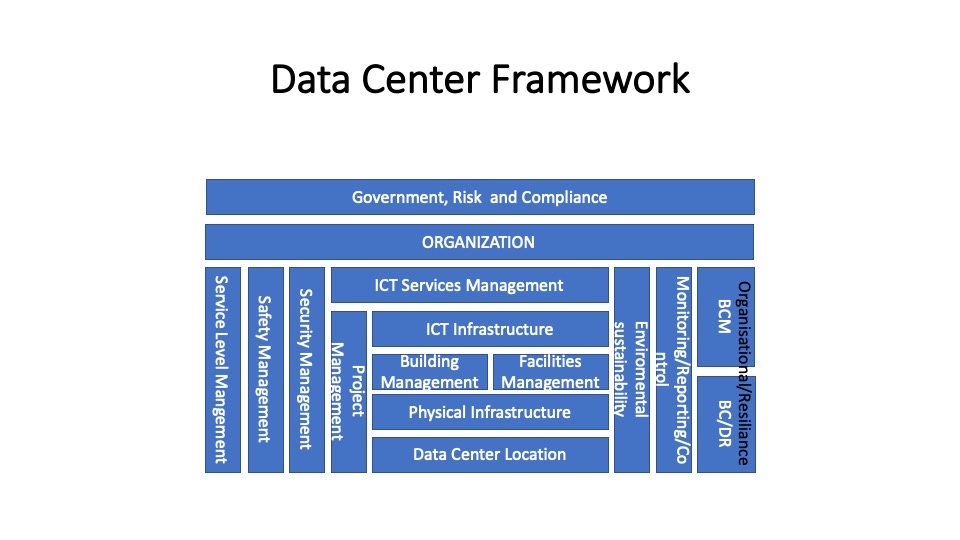
Continue to Design of New Center for Physical Infrastructure , Building and Facility Management , ICT Infrastructure, Security Management , Safety Management , Service Level Management , Monitoring , Data Center Organization and Compliance with Standard to follow
Reports including Final Design and Budgeting
Output of Data Center Design is a "Final Design match with Customer Requirement and can be expand in 5-20 Years Output of design no isue for : Heating, Cold, Flooding, Earthquake, Lighning, Air Pollution Contamination, Equipment Failure Vandalism, Unintentional Human Errors Sabotage, Network Saturation, Virus and Hacker Budgeting and Bill of Qty or Request for Material/Equipment information including Complete Data
Data Centre Contractor
With 20 years of Experiance to build Data Centres in Indonesia , we have many human resources with high skill to build Data Centres such as : Civil Works, Mechanical and Electrical , Fire Suppression , Uninteruptible Power System (UPS), Critical Air Condition (Crack/PCU) , Security System and Supporting function for The Data Centres. We can handle Tier 1-4 Type of Data Centre and get Compliance with Uptime Institute, TIA for Standard Certification for Data Center.
Insight The Building Data Centre
- The design must allow for people to be successful within the environment. You cannot create an unreliable infrastructure and place the burden of expectations of reliability on your IT staff to manage it.
- The design should be as safe and straightforward as possible.
- The design should be generally fault-tolerant
- The design should be able to scale reasonably
This guide will provide you with a singular reference architecture that I recommend for all corporate data centers to be successful. The recommendations come from many years of experience designing and operating data centers as an electrical engineer. For most reading this guide, we hope you provide this reference architecture to a consulting engineer to make sure that you are building to respect code and life safety so that they can follow the design and give you a great working solution.
Cost of Building Data Centre
There are many different features to consider when it comes to choosing your data center options, and deciding on the best data center for your company’s specific needs. Take a look at some of the key factors to bear in mind. Your Physical Footprint Think about the physical footprint you’ll need. Once you know this, you’ll be able to get a much clearer idea of the costs involved in your colocation data center. If you’re unsure of your power requirements, this is a good place to begin. Look at your current racks, and think about what’s coming. High density loads such as blade chassis and other devices may put you into the “Heavily Loaded Cabinet” or “Moderately Loaded Cabinet” brackets, which will affect cost. Your Network Requirements There is a considerable degree of variation in the costs of different network providers. Costs depend on efficiency and individual business requirements. When you look into the costs of network providers, remember that economies of scale can have a dramatic effect on pricing. Heavy network users will therefore usually be able to access more cost effective options. For the majority of businesses, a few hundred Mbps is sufficient. This is available at around the $250/mo price point, with the option to expand as a company grows.
Service Levels The level of service that you opt for will inevitably affect pricing, so this is another thing you’ll want to bear in mind. Many data centers offer a completely hands-off approach. While this will reduce costs, it does mean a heavier workload for your own team. If you’d like the support of service staff, with a fully managed service and options such as remote hands available, you will likely be looking at a slightly higher price point. However, the experience offered will be far superior, and your team will have more time to focus on other tasks. Colocation Cost Components Some data centers come with hidden costs, so keep an eye out for these. Typically these costs might include cross connect fees, additional packages such as remote hands and extra network costs that you may not have considered. When added together, these can really bump up the price of the data center. For this reason, fully managed data centers can often prove more cost-effective in the long run.
Steps, Considerations & Specifications for Building a Data Center
1. Electrical layout and general descriptions
We prefer dedicated and redundant FR3 fluid-filled transformers for primary utility entrances. Instead of separate transformers where this is not possible, the design may accept two different feeds from the same “utility building source” as the primary utility load. Regardless of feeds from the same “utility building source”, – the central entry point to the data center shall be considered the switchgear for each leg of the 2N infrastructure. An inbound TVSS (Transient Voltage Surge Suppression System) must be on the line side of the ATS for both the utility and the generator. The Uptime Institute does not consider utility diversity for tier ratings, nor even the presence of a utility. We would prefer to focus on building emergency backup generation redundancy at a point of demarcation that we control (the entrance to the DC and switchgear), rather than worrying about the more extensive utility system in which corporate data centers often have no control over. The vital key here is that, regardless of where we feed from for the 2N system, we have two entirely separate switchgear lineups with two different backup power generation systems (more on that soon). The switchgear is preferred to be a two breaker pair but may accept an “ATS” with transition switch.
The transient voltage surge suppression system should have an indicator light to show the health of the device. Each leg of the 2N infrastructure must be its independent line up of switchgear, distribution, and UPS. Sometimes we find data centers that have generators backing up the entire building; This may count as ONE generator source assuming it’s adequately designed. A UPS + distribution should feed below that to complete one leg of the 2N infrastructure. To complete the design, an entirely separate switchgear, generator, and UPS lineup should provide two truly diversely backed up cords to each rack. That entirely different system may accept the building source for its “utility source.” Still, we can’t count the same generator system twice, so we must provide a backup generator for the redundant feed. In the event of a small data center, the redundant switchgear and all critical systems may exist in the same room with the data center. Otherwise, you will want to separate, physically isolated places. In either instance, paths to and from gear, including routes out to backup generation, shall be physically diverse and isolated and will not carry down any single corridor. The physical separation between redundant feeds should include at a minimum 1 hour rated firewall. In general, we prefer to look for physical, electrical, and logical isolation between redundant components; no paralleling, no N+1 common bus, no main-tie-main, etc.
Steps, Considerations & Specifications for Building a Data Center
2. Backup power and generation
Two separate generators should feed the different legs of the 2N system – one to each switchgear. The generators should not be paralleled and will act independently of one another. Range anxiety is a real issue in smaller/remote data centers, and coordinating fuel delivery logistics for smaller facilities can be a burden. For this reason, we select diverse fuel sources for our diverse generator systems. One generator should be diesel, while the other should be natural gas. Suppose an entire building is backed up by a backup generation system. In that case, the data center may accept that as ONE feed with TVSS and other protective measures – another N of the 2N shall be provided. The fuelling power methodology of that generation system shall be unique and diverse to the backup power of the building. For example, suppose the primary building generator system is natural gas. In that case, the backup will be diesel for the other N. If the primary building generator system is diesel – the backup will be natural gas for the other The natural gas should have the capability to “rich start” in 30 seconds or less. We prefer the generator systems be physically isolated from each other. Isolation can be accomplished by placing the generators on separate sides of the building, or with sufficient distance between them. With no other options, a demising wall may be constructed to provide physical isolation — although careful with planning your airflows.
The diesel generator shall have sufficient on-site fuel for four days (96 hours) of fuel. The Uptime Institute technically requires natural gas to have a minimum of 12 hours of fuel reserve in the form of stored propane, although I do not require it. I would accept the statistical Uptime and redundancy of a two-source 2N backup generation system to specify a design for corporate data centers. The considerations of last-mile delivery challenges for small data centers must weigh against the Uptime Institute’s design theory. This break from design theory is practical for 2N systems with diverse fuel sources only. Both generators must run for an unlimited number of hours for any outage duration. Many generator manufacturers have data center guidance, specifically, the Uptime Institute approves that, and it hovers between the continuous rating and prime rating of the generators. Proper general advice would be to not exceed 70% of the prime rating of the generator under peak conditions, fully loaded, the hottest day of the year, under a failure condition of the redundant generator system per ISO 8528-1. Generators shall be ISO 8528-1 rated.
Steps, Considerations & Specifications for Building a Data Center
3. Switching and Distribution
Each leg of the 2N system must have its own entirely separate line up of power distribution. This distribution should be comprehensive – providing two of everything down to two cords to each rack with no intersections or common bus. Two layers of ground fault protection are preferred, so the neutral should carry at least to the second distribution level. Each Main distribution should feed its mechanical only panel and its own UPS/Datacenter distribution panel. All inbound feeds from the exterior to the datacenter (exterior utilities, mechanical load that is outside of the room, feeds from the main building) should have a transient voltage surge suppression system in line with the main feed. The mechanical panel may also have a TVSS system in line. My favorite gear personally for this is ASCO, and Square D. ASCO was purchased by Schneider Electric recently, and although that has caused the prices to go up, they offer rock-solid solutions at any size and price point. These two product recommendations will scale from several cabinet data centers to multi-megawatt and hyper-scale deployments very well.
My favorite gear personally for this is ASCO, and Square D. ASCO was purchased by Schneider Electric recently, and although that has caused the prices to go up, they offer rock-solid solutions at any size and price point. These two product recommendations will scale from several cabinet data centers to multi-megawatt and hyper-scale deployments very well.
Steps, Considerations & Specifications for Building a Data Center
4. UPS systems (Uninterruptible Power Supplies)
Double Online Conversion systems are the preferred system to be used. By choice, or for small data centers, in-rack UPS systems are acceptable. Each rack should have two double online conversion systems (2N), fed from each of the upstream power sources (2N). They should not parallel in any way, shape, or form. Dedicated stand-alone units should be in separate electrical rooms. As with all other distribution elements, the units should experience no greater than 80% loaded under the worst-case failure scenario while fully loaded. There is a minimum of two separate UPS systems that are each fed by one of the two different utility feeds. Battery cabinets can be a source of trouble for some, especially in small data centers. For a small data center, I would recommend the Vertiv Liebert series rackmount UPS. Make the investment and pop them into the individual cabinets at the right size in a 2N fashion. With two rack mount UPS per cabinet fed from different 2N feeds, losing a UPS or battery set is less “painful” under the 2N as well as the distributed architecture. When one fails, it’s less traumatic as well – you could easily keep a cold spare at the facility and just swap it out when the time comes. Batteries are the least reliable component of any datacenter.
These types of rackmount UPS systems are extremely approachable for IT staff as opposed to a large centralized system that is likely over their heads technically and a source for potential faults. I wouldn’t go as far as to say free-standing UPS are for the big boys only, but I would say up to about 100-200 kW of IT load that I would prefer to have these rack mounting units at least, beyond that it is pure preference. I have been into far too many data centers whose load changed over time held to single UPS systems, like an old storage appliance weighing them down. Large data centers take advantage of the economies of scale with very robust free-standing units. My favorite freestanding unit is the Toshiba G9000. As you can see, these START to become relevant at around 100 kVA and then grow from there. I have used the 750 KVA G9000’s for many years and love them.
Steps, Considerations & Specifications for Building a Data Center
5. Cooling units installation and configuration
The best classic system for a reliable facility is DX systems with individual condenser feeds along separate paths to an exterior location for heat rejection. Suppose the system is a retro-fit, and they wish to utilize legacy chiller availability. In that case, install dual-coil units so the chiller is adequately considered a utility that may go away. The reliability of the chiller, whether dedicated to the data center or building, should not contribute to the system’s overall reliability under this design. While chillers do factually provide a cooling source, we consider it a utility for purposes of a reference architecture for reasons I discuss below. I hope never to use chillers in my data center facilities designs and I will share with you some reasons why. Too often, I find that they rely on chillers as a shared resource with the building, especially in corporate data centers. Building maintenance teams are often not sensitive to the unique requirements of the data center environment. Many times, I have seen stories from end-users about the chillers shut off for maintenance with no prior notice. Standard guidance for designing nuclear plants and submarines is to minimize the number of valves used. DX units can have as few as zero valves, while chillers require a complex symphony of valves to meet minimally viable concurrent maintainability. There has to be a good reason that this is a topic of discussion in nuclear plant design?
While fault-tolerant chiller designs exist in the industry, it is with great expense, overhead, and often extremely intricate designs. It is no wonder that outages are on the rise as chillers remain a popular option for data centers. Unfortunately, design intent and philosophy oftentimes fall to the wayside on the chopping block with short-sighted cost optimization. Having operated both types of systems, the OPEX, maintenance, and ability to sleep at night is far superior with electrically commutated fan-based DX systems. All mechanical systems should be sufficiently elevated, and gravity fed to either interior or exterior drainage for the condensate pan. Each system should have an external leak detection sensor ringed around it in the event of water leaks. If a condensate pan must feed via a pump, the system must have a dual float off switch, be fed via redundant condensate pumps, and have an elevated floor dam built around it with leak sensors.
Steps, Considerations & Specifications for Building a Data Center
6. Continous Cooling
The cooling system must respond to failures such that there will be no more than a 5 degree Celsius change in any fifteen minutes. Here, we must consider the compute and general thermal load’s density against the volumetric pre-cooled space of the room as well as the time to recover for these units. Continuous cooling is pretty easy to accomplish for lightly loaded rooms. Still, for places dense for the amount of kW employed within a given number of square feet, the dynamics of heat load in the room can change exceptionally quickly even with transient failures. On small scales, we see this occur when companies begin to “outgrow” their IT closet, and on larger sizes, we see this happen with extremely high-density applications.
The time to recover may speed up via start time for generators, UPS feed the control systems for the HVAC units, and continuous supplemental power for HVAC systems via flywheel. These measures help meet the above criteria of 5 degree Celsius change in any fifteen minutes. Equipment should operate within the ASHRAE Class A1 guide for IT equipment for both humidity and temperature.
Steps, Considerations & Specifications for Building a Data Center
7. Network
Redundant carriers across redundant entry points and paths are required. There should be no single entry point or a common conduit. Conduit should not carry through an only path to the data center. In very small data centers, the network should terminate into separate racks. In larger data centers, the network should have two different Meet Me Rooms (MMR’s).
A network path to and through the street back to the main pop should also be redundant. Ideally, one feed is aerial, and one buried. This diversity will mitigate common fault due to construction or conversely, trucks and storm conditions. If one fiber path is aerial and one buried, the paths may overlap but are not preferred. We plan to do an article on in rack reliability and discussion for small to medium-sized businesses. Learn more about that here.
Steps, Considerations & Specifications for Building a Data Center
8. Fire Suppression
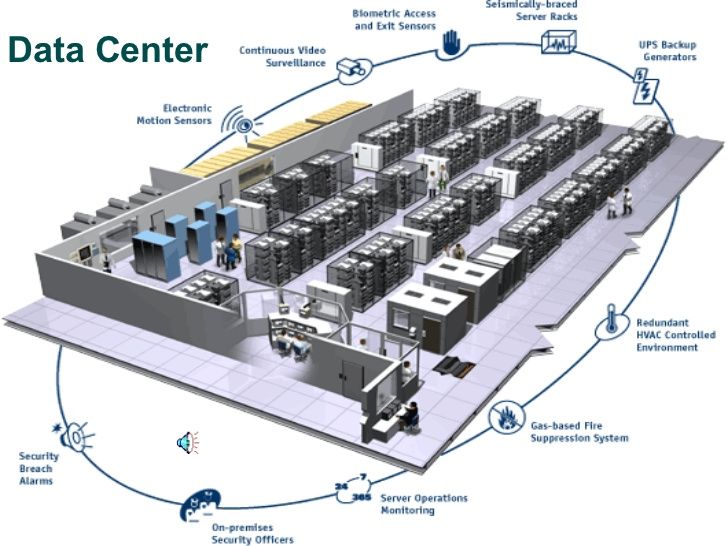
Dual interlock or gas-based fire suppression systems are permissible. Careful about the management of the environment with gas and VESDA, these systems are notorious for false alarms and life safety issues.
Steps, Considerations & Specifications for Building a Data Center
9. Building & environmental monitoring system
Switchgear, generator, UPS, and all mechanical systems (all active capacity components) shall monitor via a building management system. Environmental sensors throughout the facility provide insight into the ambient temperature. BMS shall have a daily heartbeat that will send an email to responsible parties. Spend a lot of time here thinking about what alarms are critical and what isn’t, and get this set up properly. Then get email distribution working with the vendor of your choice (I Like ALC Controls – Automated Logic) – and have email forwarding for non-emergency and pager notifications on your phone for something you feel like being woken up at 3 AM is worth it. Alarm fatigue is a real issue in the industry, so be very thoughtful about how you set this up.
Steps, Considerations & Specifications for Building a Data Center
10. Security System
Security is considered an ancillary system from the perspective of reliability site engineering. Still, each system at the point of use shall be sufficiently secure to meet the organization’s overall requirements.
Steps, Considerations & Specifications for Building a Data Center
11.Lightning protection
UL Listed Lightning protection dictates a full building set of air terminals, to include any exterior equipment. Lightning protection is good practice in any building, including one in which a data center resides. In addition to that, any inbound feeds from exterior utilities should have transient voltage surge suppression to include utility feeds from the rest of the building to the controlled data center environment.
Steps, Considerations & Specifications for Building a Data Center
12. Leak Protection
The datacenter is preferably underneath sufficient roofing to prevent any types of leaks. Rooftop mounted equipment and penetrations account for 70% of leaks, especially in storms.
Steps, Considerations & Specifications for Building a Data Center
13. Containment and air handling
The datacenter is preferably underneath sufficient roofing to prevent any types of leaks. Rooftop mounted equipment and penetrations account for 70% of leaks, especially in storms.Hot aisle containment is the preferred methodology for the comfort of the room and pre-cooling volumetric space for redundancy ride through purposes during transient failures. In the event of large clearance space, the containment may be partial with drop ceiling and ported return grates in the ceiling. The HVAC / CRAC Units may be ducted to the ceiling’s return and draw the hot air back that way. In the event this is not possible, a thermally secure containment system must be built with common ducting back to the HVAC systems. A common plenum hung from the ceiling and tied into a full or partial containment will work in areas with less clearance. Hot aisle containment is also preferable because it prevents batteries and ancillary systems from being unnecessarily exposed to heat if they are in the same space, which may be the case for small data centers. The ideal operating temperature for batteries is mid 70’s, any 10 degree Celsius variation from this will cause a 50% reduction in battery life. Alternatively, in-row cooling systems that utilize DX are acceptable and even desirable in tight areas that do not have clearance. Containment is essential here. Be careful to coordinate containment with fire protection. Many fire marshalls require either unique sprinklers in the contained space or some ability through fusible links to drop or shrink the containment in the event of a fire.
Steps, Considerations & Specifications for Building a Data Center
14. Single Corded Legacy Load
Any single corded legacy load must have a point of use static transfer switch (at the rack level) that provides instantaneous transfer between redundant sources. The STS (sometimes called ATS) shall be rated to accept two separate sources that are not phase synchronized. If you follow these guidelines for space and power, you will have an extremely well-constructed data center. No design is infallible, and operational sustainability is highly subject to a good maintenance and operations program. We will do a post soon about good basic maintenance of a data center to know the bare minimums that you should be doing on this infrastructure. For many, the level of cost and involvement to achieve fault tolerance is far too high, so it may be best to choose a colocation environment so that your IT team can focus on the higher end portions of the stack. As demonstrated here, the physical infrastructure is a far different discipline than the IT team.
Data Centre Frame Work
Data Center FrameworkBefore building a Data Center, it is necessary to know the basic basics of a Data Center Builder, so that when the builder does not occur errors due to inappropriate standards or important things that are neglected. IThe Data Center Framework provides an understanding of what functions must exist and what influences the development of a Data Center. The Data Center is an Integral part of the Bussiness . Problem ind the data center could lead to the bussiness incurring substantial loss to the point of total closure .The Data Center is a complex and dynamic space Most Downtime coused by power , Environmental , EMF Conditions and/or Human Error. For Know Data Center Plays a crucial role in High Availibility and also to be part of, and accomodate , the Fast Pace of Technology Changes. With Fact is the most of data center today are not ready for tommorow Technology , Most is not all and Data Center have experianced changes making them potential risk Factor for achieving High Availability .
Unninteruptible Power Suply (UPS)
UPS is an important component in a datacenter because the function of the UPS is to provide backup energy that is stored in the battery and distributed to the devices in the data center where when the switch between electricity and the UPS must be done directly without being interrupted or experiencing pause even for a second, because many electrical appliances can experience a momentary loss of power and cause serious damage. Generally, the UPS used in data centers is of the three phase type and most of ICT Equipment use Single Phase Power and sometimes for small data centers too use Single Phase Power .The transition from electricity to UPS generally uses a panel called "ATS" or Automatic Transfer Switch and there are those that are already built in to the UPS that have to be made / fabricated specifically.
SMI have a Services Division who have many experiance . Has done a lot of maintenance for UPS from various brands from small to large scale, and when doing maintenance we also always pay attention to the continuity of the running of the Data Center by providing backups when needed.
The battery is the main component and the price is very expensive in the UPS where the batt is currently widely used in the VRLA and Lithium types. The battery in the data center is a component that is used up, therefore it is necessary to periodically maintain the battery in the UPS, so that it can be estimated that the replacement of a battery that has been damaged is estimated. UPS Data Center based on storage usually requires a special place for the battery to be used, because the battery can trigger a fire if there is a short or unexpected event, but some current understanding goes from "Efficiency", then the UPS can be integrated into the Data Center. has good layout settings for Distribution and Maintenance.
Based on technology, the ups are grouped into two (2) namely Modular UPS and Non Modular UPS
Non Modular UPS is a UPS that has been used for a long time where the Power Module is integrated with the cabinet ups as well as the batt. Usually, the use of Non-Modular UPS must estimate the need for the development of the Data Center in the next 5-10 years and this power must be available at the beginning when the Data Center constructionRegular UPS maintenance is very important to do, ensuring the UPS is running properly and will function normally in the event of a power outage or when switching from Mains to UPS or from Generator to UPS.UPS maintenance is carried out periodically to check the condition of the existing UPS, especially in charging the Battery and Output to back up and other UPS components.
Maintenance UPS
Maintenance UPS Regular UPS maintenance is very important to do, ensuring the UPS is running properly and will function normally in the event of a power outage or when switching from Mains to UPS or from Generator to UPS.UPS maintenance is carried out periodically to check the condition of the existing UPS, especially in charging the Battery and Output to back up and other UPS components.SMI have a Services Divisiaon who have many experiance . Has done a lot of maintenance for UPS from various brands from small to large scale, and when doing maintenance we also always pay attention to the continuity of the running of the Data Center by providing backups when needed.
Sample UPS
UPS Onsite Data Centre
Single Size UPS Non Modular
Sample Of Non Modular UPS
Modular UPS
Sample of Modular UPS
Critical Air Room Conditions (CRAC)
Cooling is very important for data centers, good cooling control and can make the equipment installed in the Data Centers run well too. Every equipment installed in the data center generates heat and if the heat cannot be controlled properly, it will cause serious damage and will even make the data centers unable to run. The use of Crac is determined by several things:
- Based on the Level of the Data Center: Tier 1, Tier 2, Tier 3 and Tier 42.
- Based on the concept of Cooling that will be used
Concept with Raised Floor
Raised Floor design have been installed in many datacenter, still a large number a customer are building raised floor computer rooms. Raised Floor allow for flexible cooling arrangements and have Limited Cooling Capacity. Cooling with with Raised Floor relatively costly to install and maintain. one important handicap in Cooling with Raised Floor is "Floor Loading Restrictions" Raised Floor Design is on the primciple of an under floor cold air distribution path, whereby the hot air is flowing back to the air conditioner unit either via the room or via a dedicated duct or suspended ceiling Void. When Setup Data Center with Raised Floor choice the correct set up depend goal of data center as follow:
- Class Room Setup, is a traditional way of computer room setup, Leads to in-efficiency due to mixing of hot and Cold air and Not Recommended for Data Center now.
- Hot and Cold Aisle Set Up
- Hot and Cold Aisle Set Up with Suspended Ceiling
- 4. Placement Equipment of Racks5.
- Avoid leakage and shor circiuit of water6.
- Temperature and Air Volume in Cubic Feet per Minute (CFM) and Cubic Meter per Hour (CMH), Provided buy the raised floor should match the CF M/CMH reaquirement sof the rack.
- Perforated Tile and Equipment Placement
CRAC Concept Without Raised Floor
Non raised Floor principle typically only works well where the ICT equipments is using the fornt to rear cooling air flow , Rack are place directly on the slab . With Non Raised Floor customer have several benefits as follow : No Cost for raised floor structures, No Cleaning required under the floor , All cabling will be run overhead . When Using”Non Raise Floor” Slab must be treated proper paint to avoid contamination .
- Option in Non Raise Floor Cooling is “In Row” and “Over Duct” .
- In Row Cooling can be deployed when using a non raised floor setup , cooling close to the heat load leads to good efficiencies for airflow, Less Racks per Sqmts/Sqft inside the computer room.
- Overhead Duct , Overhead , Ducted cooling dumps cold air directly in front of the racks and extract the hot air from the back.
- Duct have often louvers/vents to regulate CFM/CMH.
- Duct must be well Designed and ensure enough air volume can be dumped and extracted at the rights locations
- Air Conditioner redundancy must be taked into account .
- Do Not Pait the ducts as paint might splinter of over time cousing particiulated to contaminate the room .
- Inspec and clean ducts on a regular basis
CRAC Concept Suplemental Cooling
you need to add additional cool air to a space that is already outfitted with an air conditioning system, you require supplemental cooling. Some reasons you may require supplemental cooling include:
- Certain areas of your building are warmer than other parts
- The existing primary cooling system is too small for current conditions
- The number of people or equipment occupying a space increased, thus increasing the need for more cool air.
Benefit of Suplemental Cooling
- Heat or cool certain areas/rooms to a different temperature than the entire building—this is ideal for server rooms and data centers.
- Provides cool and comfortable air in hot pockets, say for instance on TV or movie production sets where a flurry of lights and equipment quickly heat up.
- Provides a solution to air conditioning units that are too small to adequately cool a space.
If data Center Use Suplemental Cooling Concept must concern several issue at Suplemental Cooling as follow :
- High Density Cooling using Air Duct Fan
- High Density Coolog using Hot Air Fan
- High Density Cooling using Overheat Supplement Air
- High Density Cooling Using In Row Cooling
- High Density Cooling using Rear Door Heat Exchanger
- High Density Cooliong Using : Shelf Contained
CRAC Concept Containment Cooling
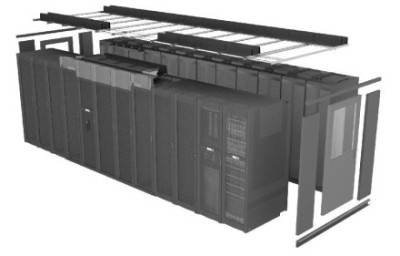
Containment concept is principle whereby we create compartmentalized area to contain either "Hot Air" or "Cold Air or Both . Containment can with done or without a raised floor. Containment Potentially impact fire supression, couse containment based cooling creates a "room in a room" concept and therefore fire suppression needs to be adjusted to ensure compliance to regulations . Containment can be done with : Deploy partial containment , "Break" Containtmnent upon fire suppression acstivation , Deploy Hypoxic air fire suppression and Deploy fire suppression within the contained area.
Hypoxic air fire Prevention based system to rteduce the oxygen level within the computer room to typicaly around 15% oxygen which prevents a fire from starting and when using hypoxic should be considered a prevention system instead of a suppression system
CRAC Maintenance
Cooling in a data center, seeing the explanation above is a very important requirement because data center operations will depend heavily on the cooler in the Data Center, therefore to ensure it runs well, periodic maintenance is required for the cooler in the data center. use it in the data center to ensure all devices are properly cooled and there is no temperature increase which results in malfunction of the equipment installed in the Data Center and interferes with the operations of the Company / Public Service.SMI already have a lot of year maintenance service for many data center in Indonesia and we have good team to work and make your data center health and have the perfomance in cooling system .
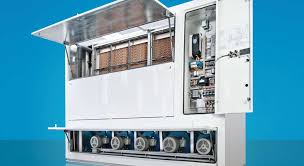
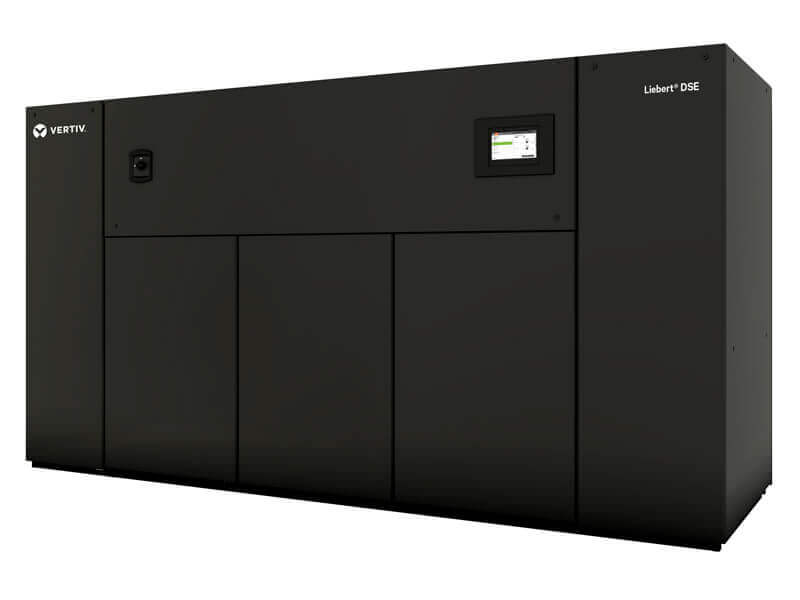
Sample of Crac
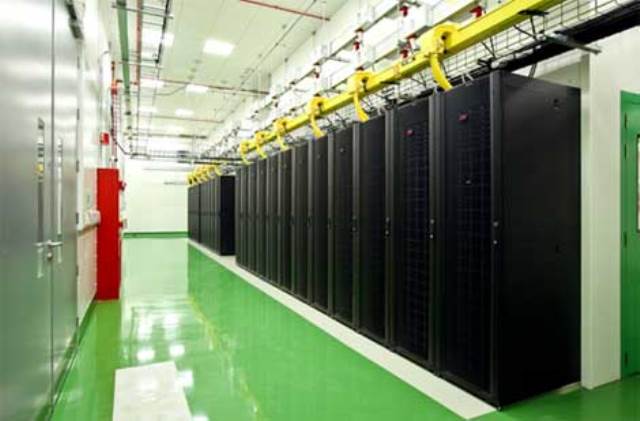
Fire Protection and Safety
Most fires in Data Centres originate from electrical sources such as : Equipment (Overheating, Zinc Whinskers or Dead Shorts) , Electrical Distribution (Wiring, Loose Coonections, Sparks) and Light Fixtures
Another Contributing is a Bad Connection , Over Loading and Dust . During various data centre audits conducted it is proven that high percentage of data centre's haver (Potential) issues with their fire protection .
Fire Suppression Requirement
- Detect as Early as Possible.
- Safe for Humans (as much as possible)
- Environmentally friendly
- Effective for fires in the data centre and Supporting Facilities
- Do not or minimize, Damage to sensitive equipment
- Comply with national and Building Code
Standards for FIRE SUPPRESSION ON DATA CENTRE
- NFPA 75
- NFPA 2001 /ISO 14520
- Local Codes
- Standards Typically describe Safety Measures Gas/Flooding and allow Exposure Levels Cardio-Toxicity and allowable exposure Levels Not Obseerved Adverse Effect Level (NOAL) - Highest concentration of agent at which no "Marked" or adverse effect occured Lowest Obsederved Adverse Effect Level (LOAEL) - Lowest Concentration at which and adverse effect levels measured
Detection System
Data Center have Detection System Called :
- VESDA (Very Early Smoke Detection Apparaturs) or HSSD (Highly Sensitive Smoke Detection Works Via Air Sampling As Much as 1000 More sensitive than standard smoke detectors Care must be taken , especially during building works
- Smoke Detectors for Fire Panels Ionization Detections ( Uses low radiations (Harmless) Photoelectric Detectors
FIRE SUPPRESSION SYSTEM BEST PRACTISE
- Install VESDA /HSSD Type of System
- Use any of the gas based systems as primary fire suppression system
- Use Pre Action sprinkler as Secondary Syste,
- Ensure that the room is properly sealed
- Ensure That Gas Content is enough to achieve concetration levels required
- Cread Extration vents
- Proper maintenance
Gas for Fire Suppression
Fire suppression in Data Center have many type of gas , we must be carreful to choice it , couse some gas not allowed to used in Many country and not safe for human . In Indonesia many Data Centre use FM 200, Noved . Inergen and Argonite . Let me
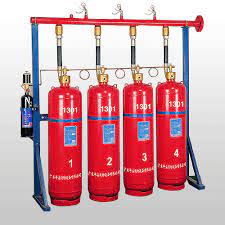
Halon 1301
Production Clear after Jan 1 1994 and In All europe all system based on Hallon to be de- commissioned before Dec 31 2003 . Have problem with the Ozone layer Banned in most Countries
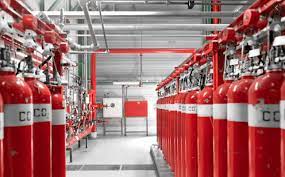
CO2
CO2 one of the lowest prioce clean Agent , Veryy Effective for fire suppression , Lethal at total flooding concetrations (34%), have severe health problems at lower concetrations. Cost Effective installation and Maintenanfce Not Allowed to be used in most Countries in occupaid areas
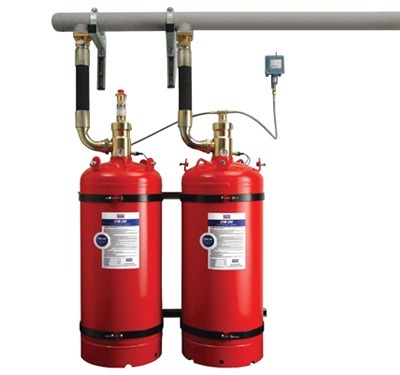
FM 200
Widely Used in Many Data Center in the World Not Harmfull to humans in itself Gas not Clear during discharge Gas container should be reasonably close to data centre Leaves no residu Some country alreadydo not allowed or restricted the usage of fm 200 such as denmakr, iceland and more
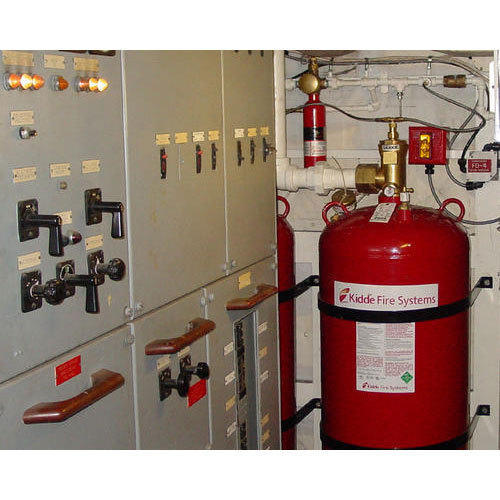
Novec 1230
Cost Effective installation and Maintenance Verry Effective for fire suppression Clear gas Environmentally safe Gas Container should be reasonable close to data centre Containers can be refilled on Site
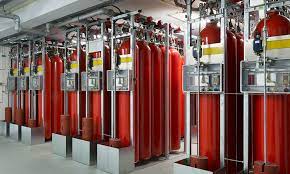
Inergen IG 541
Composed Comp-letelly of naturally reocurring gasses. Not harmfull to humans (Limited Time). Clear during discharge. In - Expensiove to recharge. Very High Pressure gas. Pressure Relief dampers need to be. installed in Room . Large storage required . gas containers can be far away from computer room . Allows for Zooning .
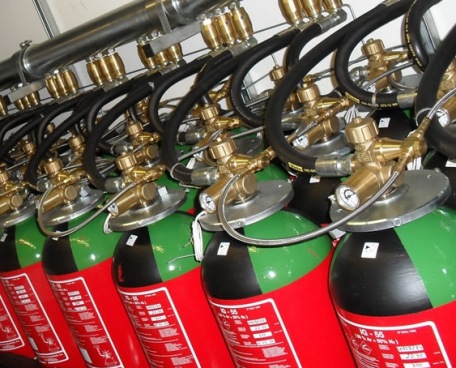
Argonite IG 55
Composed Comp-letelly of naturally reocurring gasses. Not harmfull to humans (Limited Time). Pressure relief dampler need to be installed in Room. Reduce oxygen levels down to approx 12.5%. Relatively fast Acting . Relatively in Expensive .
Scalable Network Infrastructure
Network Cabliung is the foundation to support a high availability data centre , IT Equipment and its application . Proven Product and contractors are crucial for a proper design , Installation works and maintenance of a cabling infrstructure . It will reduce downtime and Improve for Operational Efficiency , Manageability , Reliability and Availibilty . With good structured Cabling System can be : Reduce risk of Down Time, Easy for Re Patching, Easy for Fault Finding , Better Cooling , and Standarized Lenght .
We can manage Data Center with Poor Cabling .Make Sure your data center have good design for Structured Data Center.
Cooling for data center will get big problem when Data Cable closed all air flow for Cooling, We must have design and planning for 5-10 Years in the future .
Standarization
Standard for Structured Cabling using TIA/EIA 568 for Cooper Wire and Fiber Optic Cable . Cooper Wire charateristic for Data Center as follow : Unshielded/Shielded , Solid Calbes with makximunm lenght 90 M , Flexible/Strainded Cables (Patch Cords) for Patch Panels/Short Distances with Maximum Lenght < 10 Meters and Total Lenght is 100 M Including Solid and Flexible.
Cooper Cable
Cooper Cable Commonly use catergory 6 or Higher for better connection with Shielded or Unshielded . Cooper Termination will use structured Cabling Patch Panels with Flat or Angled Panels . Patch Cable should always be the same or class higher than structured Cable . Match Shielded or Unshielded Twisted Pair . Patch Cable must be use Pre Fabrication or No on Site Termination . Every Node termination mus be test with Proven Cable Tester .
FIBER OPTIC
Light is emitted as pulses at the source (Laser/LED) , Light transport through the Fiber bouncing off the cladding allowing it to travel theoretically "Endlessly" . Receiver the thight pulses and converted it to Data . Characteristic of Fiber as follow : Distance longer than cooper , Not Prone to EMF , Lightweight and smaller than cooper . Fiber Comes with Various size and spesifcations such as :L 62.5/125 Um and 50/125 Um (Multi Mode cable) and 8.3/125 U, (Single Mode).
Fiber Termination on Patch Panel used Fiber Patch Chord : SC 9Replaced by LC or Mini LC) , MPO Now used for 40 Gbps and Higher speed Links, Evbery Fiber Connection must be handle with care and ensure connectors are always cleanned before termination .
For Cerritfication and Best Perfomance all Data Center must Follow TIA 942 Network Cable Logical Architecture for Installation and get Best Perfomance of Cable Installation .
PT. SMI is a leader in Structured Cabling Contractor , we work with many famous Brand in The World such as : Comscope, NetConnect, Panduit, Belden , LS Cable , Nexan, Draka and many more.
We have many site of project refference from small to large Structured Cabling Project .
Containment Data Center
Data centers need more effective airflow manage¬ment solutions as equipment power densities increase in the racks. Five years ago the average rack power density was one to two kW per rack. Today, the average power density is four to eight kW per rack and some data centers that run high density applications are averaging 10 to 20 kW per rack.
The cost of electricity is rising in line with increasing densities. “The cost of electricity is about US$0.12/kWh for large users. The forecast is for a greater than 15-percent rise in cost per year over the next five years,”
Containment makes existing cooling and power infrastructure more effective. Using containment, the data center makes increasingly efficient use of the same or less cooling, reducing the cooling portion of the total energy bill. Data centers can even power down some CRAC units, saving utility and maintenance costs.
Containment makes running racks at high densities more affordable so that data centers can add new IT equipment such as blade servers. Data enter containment brings the power consumption to cooling ratio down to a nearly 1 to 1 match in kW consumed. It can save a data center approximately 30-percent of its annual utility bill (lower OpEx) without additional CapEx.
Containment Benefits Vendors design containment solutions for fast, easy deployment and scalability for data center growth. Data center containment enables the creation of a high-capacity data center in a very short period of time (hours).
Containment enables IT professionals to build out in¬frastructure, data processing, and cooling loads in small, controlled building blocks as demand grows. This is more affordable than building the data center infrastructure to handle the maximum cooling and data processing load from day one, which is the traditional method. Contain¬ment increases its cost ef¬fectiveness as rack densities increase.
Data centers typically have more cooling capacity than the load requires. Still, this capacity does not cool equipment adequately. By raising the delta T, containment avoids the capital expense of adding more mechanical cooling. As you operate cooling under higher return temperatures, cooling becomes more efficient.
The smaller the percentage of total energy the data center uses to feed cooling, the greater the percentage of total energy it uses to feed IT equipment. This results in a lower PUE, which should be closer to a 1:1 ratio.
Standardization is an operational benefit of containment. Vendors engineer containment into building blocks so that as the data center grows, he enterprise simply adds more uniform pods. Containment reliability and integrity derive from design redundancy that mitigates the downside risk of cooling system failures.
Containment aligns with the enterprise by offering a low TCO including low and progressive acquisition costs, quick time to deploy, and lower operational and maintenance costs. Maintenance costs grow only as the data center adds containment pods.
Raised Floor
what is the raised access floor?
The raised access floor, also called “floating floor” or “false floor”, is a system created to meet the technological needs of technical rooms and allow easy accessibility and maintenance of infrastructure cabling system on Data Center and Good For Cooling Airflow .
A raised floor in a data center is an elevated floor that is built two inches to four feet above a concrete floor. It creates a space that can be used for cooling, electrical, and mechanical services. In data centers, raised floors are also used as a way of distributing cold air. By using a raised floor, facilities not only reduce the amount of air needed to cool equipment, they also require less energy and improve temperature distribution across all of the cabinets. According to research on the impact of raised floors on thermal behavior in commercial buildings, the presence of a raised floor can potentially reduce the cooling load by as much as 40 percent. Combining this system with an AI cooling solution could deliver even greater savings.
Keeping Cool
Servers in data centers generate a huge amount of heat, presenting a major problem for data center designers and managers alike. When servers overheat, a common reaction is to consider getting extra cooling capacity, which is based on the assumption that the existing cooling infrastructure isn’t capable of maintaining a proper temperature. In reality, the problem may not be the result of insufficient capacity, but rather poor airflow management.
In order to keep the data center cool, a common practice is to install perforated raised floor tiles within cold aisles. These perforated tiles typically are not installed in hot aisles, unless there is a maintenance tile in place. These maintenance tiles give employees access in a warmer environment, so they can work in comfort. However, maintenance tiles should not remain in place permanently as they restrict air flow.
Sometimes grates are used as a quick fix for hot spots in a data center. However, since a grate can allow up to three times more air than the perforated raised floor tile, using them will exacerbate the issue. Managing the placement of raised floor tiles is critical. If not enough tiles are installed, the air can begin to recirculate. If too many tiles are installed, it can allow air bypass. If a choice must be made between recirculation and bypass, then bypass is preferable.
Cabling and Additional Equipment
Having a raised floor in a data center also makes it easier to do equipment upgrades or install completely new equipment. This can include the installation of cabling and redeveloping the premises for other purposes. A raised floor is a good design strategy when there is a large amount of data center cabling to run. This is more efficient and can cost less than systems that are mounted near the ceiling. It can also help with the number of hidden cables and consolidation of physical ports and power plugs.
Running data center cabling under the raised floor tiles also helps to keep the data floor uncluttered and neat. Without overhead wiring systems in place, there’s nothing to block light fixtures and data center technicians don’t need a ladder to access cabling. Making a change to data center cabling is a simple matter of identifying the correct floor panel and removing it rather than accessing overhead trays that are located close to servers, light fixtures, and sprinkler systems.
Flexible Design
When setting up an initial design for a raised floor, data center engineers should consider the facility’s future development needs. This makes it easier to factor in the amount of free space needed to install both current and future equipment. The space beneath the raised floor tiles should be designed to allow cool air to circulate efficiently. Once a floor is installed, it’s critical for data center personnel to perform regular maintenance on the area, which includes taking special care to make sure it stays clean.
Since cold air can be channeled under the floor, a data center with a raised floor offers more versatility in terms of equipment deployment than a slab-based design. Rather than bolting the cabinets to the slab and directing cooling from above, raised floor tiles are more modular, allowing the facility to relocate equipment without the need to install new cooling infrastructure overheat.
Raised Floor Tile Maintenance
Cleaning underneath raised floor tiles helps keep out pollutants that could potentially pose a hazard to operations. Dust can get underneath the raised floor tiles and flow into equipment. The good news is that most data centers adhere to a regular policy of cleaning underneath the raised floors. This ensures the space created beneath the raised floor tiles is clean and free of contaminants, reducing the amount of dirty air getting pushed into the servers, which can increase the risk of equipment failure.
Cabling layout is very important in a facility with a raised floor. Just because the cabling will be out of sight doesn’t mean it can be out of mind as well. If too many cables are piled up in any area, they could significantly restrict or even block airflow, preventing some equipment from getting the cooling resources it needs. Data center managers need to carefully monitor how cables are arranged, especially when new lengths are being laid down or existing cabling needs to be replaced.
Raised floors may be one of the oldest design standards found in data centers, but they remain a popular strategy for managing cooling needs and cable deployment. By maximizing the potential of raised floors, data center managers can ensure that their facilities will remain efficient and effective for many years to come.